Tutorial
How to Set Your Default AI Model
Pick once. Use forever. Change whenever.
Last week we wrote about users refreshing ChatGPT 10 times just to dodge GPT-5.2. The post hit a nerve.
Users found models they like (GPT-4o, GPT-4.1) and OpenAI keeps swapping them out without asking.
The Fix
You can pick your model and keep it.
In 1AI, you pick GPT-4o from November 2024, and that's what you get every time you open a new chat.
Step 1: Open the model picker
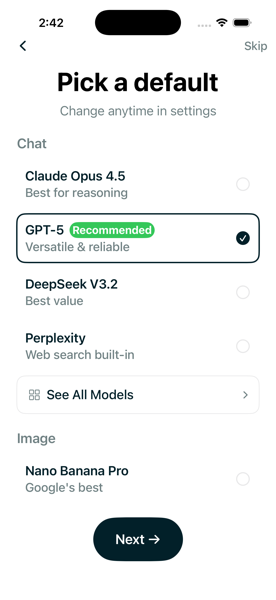
During onboarding, you'll see recommended models like GPT-5 and Claude Opus. These work great for most people. But if you want a specific model like GPT-4o, tap "See All Models" at the bottom.
Step 2: Search for what you want
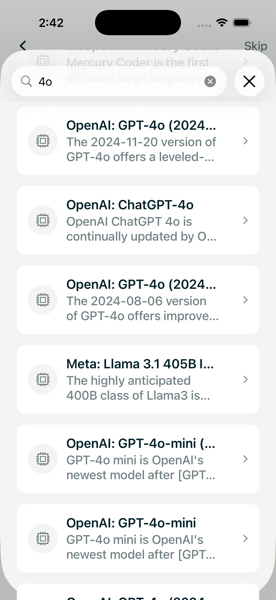
Type "4o" and you'll see every version, including dated snapshots like gpt-4o-2024-11-20 that OpenAI keeps available through the API but hides from ChatGPT users.
Step 3: Select it
Tap your choice. It becomes your default for every new chat.
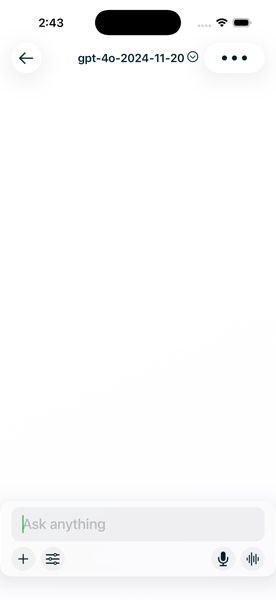
Bonus: Tap the model name in the header to switch mid-conversation.
Your choice persists across sessions. Change it in settings whenever you want.
Updates
I write when I ship something or figure something out. Maybe twice a month. No tracking, no growth hacks.