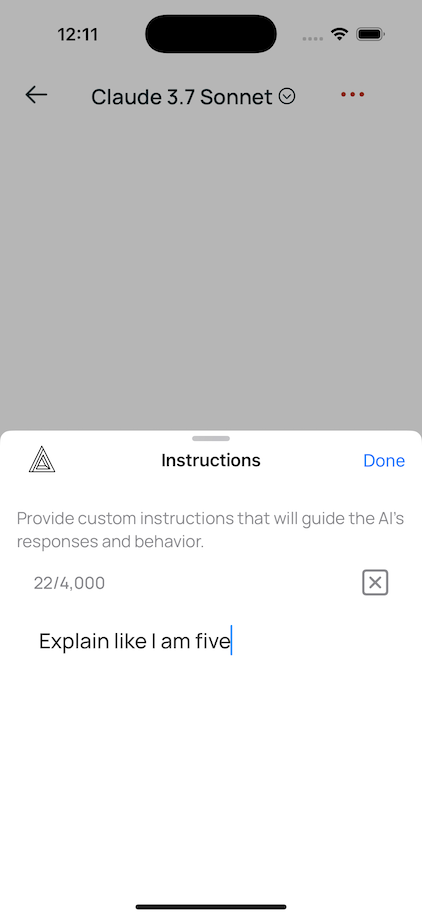
Write a few sentences about yourself and your preferences. AI uses this context for every response.
Setup
- Open any chat -tap "Ask Anything" from home
- Tap the three dots -top right corner
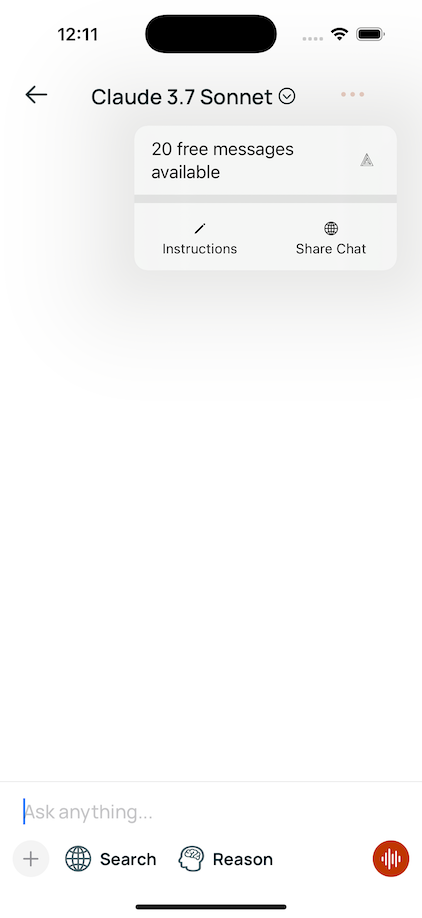
- Select "Instructions"
- Write your preferences -who you are, how you want responses
What to include
About you
- Role: "Senior marketing manager" → strategic insights, not basic tips
- Level: "Expert in React" → skips beginner explanations
- Goals: "Building a SaaS startup" → focuses on scalability
- Tools: "I use Figma and Tailwind" → compatible solutions
Example:
"Software developer, 5 years experience. React and Node.js. Learning machine learning. Prefer practical examples over theory."
Response style
- Tone: "Be direct" → cuts the fluff
- Detail: "Executive summary first" → respects your time
- Format: "Use bullet points" → scannable responses
- Level: "Explain like I'm a pro" → technical depth
Example:
"Be concise. Key insight first, then details. Use bullet points. Real-world examples."
Tips
- Be specific -"B2B SaaS" beats "tech"
- Update when needed -new project? Update your instructions
- Test and tweak -try a few chats, refine what doesn't work
Examples by role
Student
"CS sophomore. Data structures, algorithms, databases. Learn best through examples. Break complex topics into steps."
Marketer
"Marketing manager, B2B SaaS. Content and lead gen. Actionable strategies with metrics. Skip theory."
Designer
"Freelance designer for startups. Figma, current trends. Practical solutions within startup budgets."
FAQ
Works with all models?
Yes. Claude, GPT, Gemini, all 300+ models. Set once, works everywhere.
Different instructions for different chats?
Instructions apply globally. Update anytime -takes seconds.
Character limit?
Keep it to 2-3 paragraphs. Quality beats length.
Private?
Yes. Encrypted, tied to your account only. Never shared.
Last Updated: June 17, 2025